Everyday Technology

Why Is the USB Always Upside Down?

The connector that achieves failure 100% of the time, on the first two attempts. A USB plug has two sides. One of them is correct. You will, with near-mathematical certainty, try the wrong one first, correct yourself, then somehow try the wrong one again before finally succeeding. This is not incompetence. This is a design that managed to make a coin-flip feel like an impossible puzzle. The answer involves asymmetric internal design, an era before manufacturers cared much about user experience, and the reason the problem has now been definitively, if belatedly, solved.

Quick answer

The original USB-A connector looks nearly identical on both sides but is internally asymmetrical, with contacts on one side only, meaning one orientation works and one does not, and without clear visible differentiation the user cannot reliably tell which is which without a marking they rarely see. USB-C, the modern standard, is fully reversible and works in both orientations - solving a problem that existed for nearly thirty years while the original USB specification was in use.
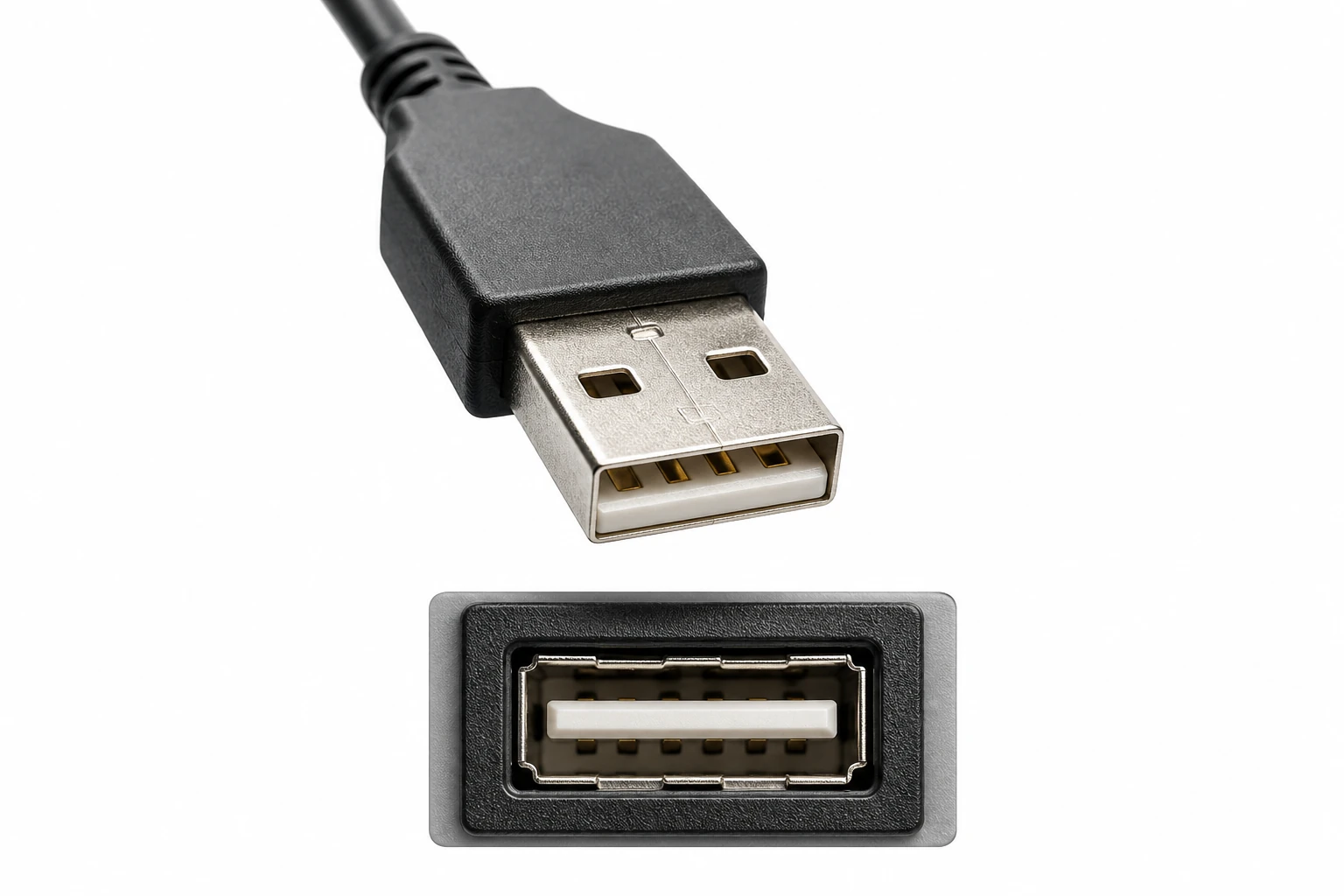
Why Is the USB Always Upside Down? hero image

The mystery

The answer involves asymmetric internal design, an era before manufacturers cared much about user experience, and the reason the problem has now been definitively, if belatedly, solved.

The short answer

The original USB-A connector looks nearly identical on both sides but is internally asymmetrical, with contacts on one side only, meaning one orientation works and one does not, and without clear visible differentiation the user cannot reliably tell which is which without a marking they rarely see.

The twist

USB-C, the modern standard, is fully reversible and works in both orientations - solving a problem that existed for nearly thirty years while the original USB specification was in use.

Common mistake

Many people assume their failure rate is simply bad luck - an equal chance of right and wrong.

A connector designed without considering the person holding it

The USB-A plug's orientation problem is a classic case of engineering that solved the technical problem without fully considering the human interaction.

The design is asymmetric inside but nearly symmetric outside

The USB-A connector's contacts sit only on one face of the internal plastic spacer, making one orientation electrically functional and the other not. However, the outside dimensions and shape are nearly identical in both orientations.

This means the connector looks equally plausible upside down or right-side up, making correct first-attempt insertion essentially a coin flip.

The USB plug was designed with perfect internal logic and almost no concession to the fallible human who would need to use it in low light.

Markings help but are rarely noticed

USB-A connectors technically have orientation markings, usually a small USB trident symbol or a seam line on the correct face, but these are typically small, poorly lit, and positioned so that checking them requires effort that most people skip.

The connector's near-symmetry creates strong visual confidence that is frequently wrong.

The USB specification thoughtfully included orientation markers. The USB specification did not think carefully enough about where people typically plug things in.

USB-C finally solved the problem

The USB-C connector, introduced in 2014, is a fully symmetrical design that works identically in both orientations, requiring no alignment whatsoever.

It arrived about twenty years after the problem was first universally identified, which is approximately the timeline technology follows when solving problems that engineering considers minor but users consider infuriating.

It took the technology industry roughly two decades to implement the obvious fix for a problem that annoyed approximately everyone who ever used a computer.

Why getting it wrong feels so consistent

A short explanation of why the USB plug defeats intuition so reliably.

1

01. The plug looks symmetrical to the human eye

Near-identical top and bottom surfaces make both orientations appear equally valid.

2

02. One orientation is chosen - often the wrong one

Without reliable visual cues, the choice is approximately random.

3

03. Resistance is felt and the plug is flipped

The failed attempt is corrected by rotating the plug 180 degrees.

4

04. The second attempt sometimes fails again

Overcorrection or spatial confusion during the flip can produce a second wrong-orientation attempt.

Why this problem persisted for so long

The USB standard was created in the 1990s primarily to standardize data transfer between computers and peripherals, and the design prioritized electrical function, cost, and manufacturing simplicity over reversibility.

At the time, the cost of adding reversible contacts was considered greater than the user experience benefit - a calculation that looks different from the vantage point of everyone who has tried to charge a phone in the dark.

Surprising USB design facts

The correct orientation is actually marked
Most USB-A plugs have the USB logo or a visible seam on the top face when correctly oriented.
USB-C requires over twice as many internal contacts
Full reversibility required significantly more complex internal contact engineering than the original asymmetric design.
The problem was recognized by engineers at the time
Some of the original USB specification engineers later acknowledged that reversibility was considered and rejected on cost grounds.

Is it random which orientation you pick?

Myth

Many people assume their failure rate is simply bad luck - an equal chance of right and wrong.

It feels random precisely because there is no clear visual information to use, but any systematic bias in how people naturally orient connectors tips the odds.

Reality

Studies and informal experiments suggest people systematically choose the wrong orientation more than 50% of the time, possibly due to a consistent bias in how people orient objects for insertion.

Studies and informal experiments suggest people systematically choose the wrong orientation more than 50% of the time, possibly due to a consistent bias in how people orient objects for insertion.

Where similar design-versus-user conflicts appear

SIM card trays
Early SIM card trays were similarly difficult to orient correctly, before notched or clearly marked designs became standard.
Headphone jacks
The standard 3.5mm jack is fully rotationally symmetric and works in any orientation - a simple user-friendly design that predates USB by decades.

Why this small frustration matters in design terms

The USB orientation problem became a textbook example in user experience design of what happens when engineering optimization ignores human factors.

It is now routinely cited in product design courses as a case study in the cost of omitting usability from technical specifications.

Worth noting

A small rectangle that united humanity in frustration

The USB plug managed to make a binary choice feel genuinely difficult, for nearly three decades, for almost everyone who tried it. Few engineering decisions have collectively cost humanity more accumulated seconds of minor, muttering frustration.

Quick answers

Common questions

How do you quickly tell which way a USB-A plug is oriented?

Look for the USB trident symbol or a small seam line, which should face up when the plug is inserted into a horizontally oriented port.

Will USB-A be phased out entirely in favor of USB-C?

Gradually, yes, though USB-A ports remain widespread on existing devices and infrastructure and will take years to fully disappear.

Everyday Technology

Related questions

Cost, manufacturing complexity, and backward compatibility concerns delayed reversible design until the USB-C generation.

The designers who finally fixed it

USB Implementers Forum - USB-C Working Group

The industry group that developed the USB-C specification introduced full reversibility as a core design requirement.

Related questions

Is Lightning, the Apple connector, reversible?

Yes, Apple's Lightning connector is fully reversible, introduced in 2012 before USB-C standardized the approach.

Where similar design-versus-user conflicts appear

SIM card trays

Early SIM card trays were similarly difficult to orient correctly, before notched or clearly marked designs became standard.

Where similar design-versus-user conflicts appear

Headphone jacks

The standard 3.5mm jack is fully rotationally symmetric and works in any orientation - a simple user-friendly design that predates USB by decades.

Is it random which orientation you pick?

Studies and informal experiments suggest people systematically choose the wrong orientation more than 50% of the time, possibly due to a consistent bias in how people orient objects for insertion.

Studies and informal experiments suggest people systematically choose the wrong orientation more than 50% of the time, possibly due to a consistent bias in how people orient objects for insertion.