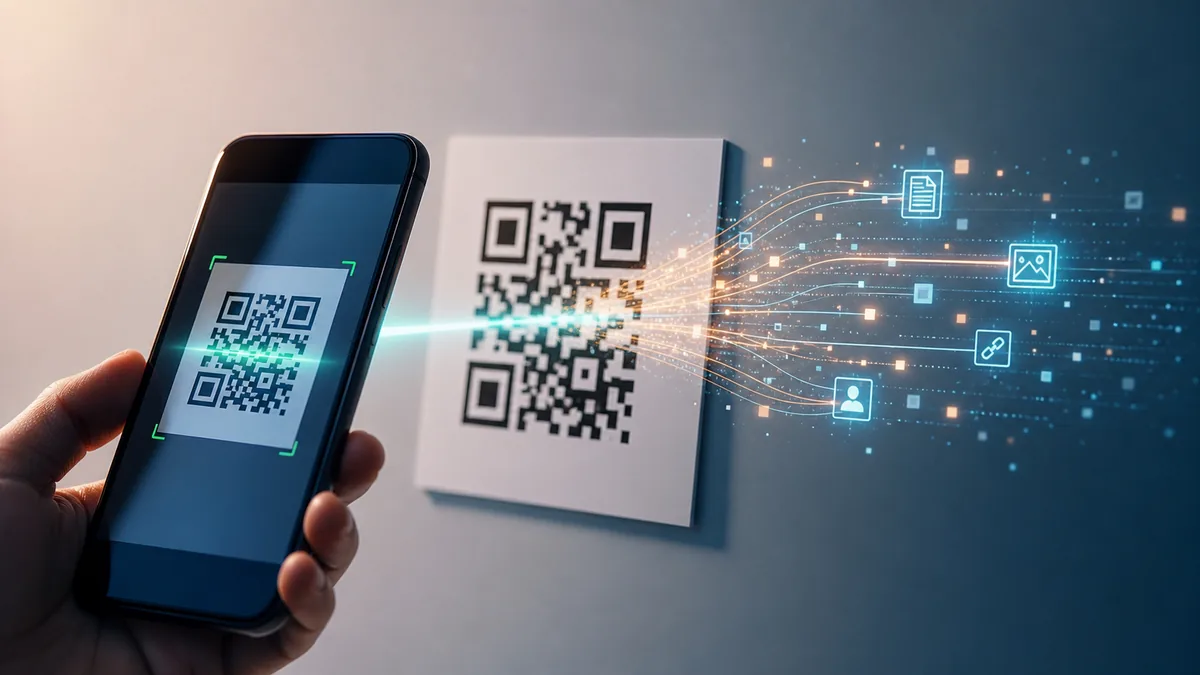
Visual answer
How a QR Code Is Read
From camera pointing at a square to an action on your screen, the six steps that happen in under a second.
Camera captures the QR code
The camera takes an image of the QR code, from any angle, on any surface, including a screen, a printed page, or a screenshot.
Finder squares locate the code
The three large squares in the corners are detected first. They tell the software exactly where the code is and which way up it is.
Software maps the grid
Using the finder squares as reference points, the software draws a precise grid over the entire code and identifies each individual module, each black or white square.
Black and white modules decoded
Each module represents a binary value, black is 1, white is 0. The software reads the pattern in a specific sequence and converts it into raw data.
Stored information extracted
The raw binary data is decoded into readable information, a web address, payment details, contact card, or whatever was encoded when the QR code was created.
Device performs the action
The decoded information is handed to the relevant app. A URL opens in a browser. A payment is initiated. A Wi-Fi network is joined. The action happens instantly.
How they work
How Do QR Codes Work?
Every piece of information a QR code holds, a website address, a payment reference, a Wi-Fi password, has been converted into a pattern of black and white squares before you ever look at it. Each square represents a binary value. Black means one. White means zero. Enough ones and zeros in the right order and you can encode almost any information.
When a phone scans the code, the camera captures an image of the pattern. Software running on the phone locates the code in the frame, straightens out any angle or distortion, reads the arrangement of squares in a precise sequence, and converts it back into the original data.
The whole process happens in under a second. From a visual pattern your brain sees as a random arrangement of squares, the phone extracts an exact string of information and acts on it. The code is not random at all, every square has a specific meaning in a specific place.
How phones scan them
How Does a Phone Read a QR Code?
The first thing the scanning software looks for is not the data, it is orientation. A QR code has three large squares positioned in three of its four corners. These are called finder patterns. Their job is to tell the software immediately where the code is, how big it is, and which way is up. No matter how you angle the phone, or if the code is slightly skewed, the finder patterns let the software correct for it.
On an iPhone, the camera app has had built-in QR scanning since iOS 11. Point the camera at a code and a notification banner appears at the top of the screen, no separate app needed. On Android, the default camera app on most modern devices handles QR codes natively as well, with Google Lens available as a fallback for older models.
Once the finder patterns are located, the rest of the code is a structured grid of data modules. The software reads them in a fixed pattern, not left to right like a book, but in a specific zigzag sequence defined by the QR standard, and converts the binary values back into usable data.
Storing information
How Do QR Codes Store Information?
A QR code is a two-dimensional barcode. Where an ordinary barcode stores information in one direction, in the width and spacing of vertical lines, a QR code stores information in two directions: both across and down. This is why QR codes can hold so much more data than traditional barcodes.
The squares in a QR code are called modules. A small QR code might have a 21x21 grid of modules. A large one can have up to a 177x177 grid. Not all modules carry data directly, some form the finder patterns, some indicate the code's format and version, and some carry error correction information.
Error correction is one of the genuinely clever things about QR codes. Part of the data in every code is deliberately redundant, it exists so the code can still be decoded even if up to 30 percent of it is obscured, damaged, or decorated. This is why you can put a logo in the middle of a QR code and it still scans, and why a code on a slightly crumpled receipt usually still works.
Payments
How Do QR Codes Work for Payments?
A payment QR code is really just a carrier for a payment identifier, a string of data that tells a payment app who is being paid, for how much, and through which system. The QR code itself does not contain money or bank account details in any dangerous sense. It contains a reference that the payment app uses to initiate a transaction through its own secure channel.
In practice there are two models. In one, the merchant displays a QR code and the customer scans it, the code encodes the merchant's payment address, and the app uses that to send funds. In the other, the customer shows a QR code generated by their own banking app and the merchant scans it to pull the payment.
Either way, the QR code is just the handshake that connects two parties. The actual financial transaction happens through the payment network, which has its own security layers entirely separate from the QR code itself.
Business cards and more
How Do QR Codes Work on Business Cards, Instagram and Wedding Invitations?
In every one of these cases, the QR code is doing the same fundamental thing: storing a piece of information that would otherwise require the person to type something out. The code is just a shortcut with better accuracy.
A business card QR code might encode a vCard, a standard format for contact information, so that scanning it immediately adds the person's name, number, email, and company to your contacts without any typing. Or it might simply be a link to a website or LinkedIn profile.
An Instagram QR code encodes a link to a specific profile. Scanning it opens the profile directly in the Instagram app or a browser, bypassing the search step entirely. Wedding invitation QR codes usually link to a wedding website, directions, RSVPs, accommodation suggestions, all in one scan. The code is elegant precisely because it contains nothing except the link, and the link does all the work.
Screenshots work too
Do QR Codes Work Through Screenshots and Photos?
Yes. The scanner only needs a clear image of the pattern. It does not care whether that image is a live camera feed, a screenshot saved to your photos, a picture printed on paper, or a code displayed on someone else's screen.
This is why screenshotting a ticket QR code works at concert venues, transit gates, and airports. The code on screen is the code in the screenshot is the code printed on paper, they are all the same pattern. As long as the image is reasonably sharp and not heavily compressed, it scans just fine.
The important thing is contrast and resolution. A QR code screenshot that is very small, very blurry, or has had its colours altered might fail to scan. But a clean full-size screenshot at normal screen resolution will almost always work as reliably as the original.
Internet not required
Do QR Codes Need the Internet?
The QR code itself has no connection to the internet. It is just a pattern. Decoding what is stored in the pattern requires only the camera and the scanning software, no internet needed for that part.
What happens after decoding depends entirely on what the code contains. If the code encodes a web address, opening that address requires an internet connection. If it encodes a Wi-Fi password, your phone can join the network without any internet. If it encodes plain text or contact details, no connection is needed at all.
So the answer is: QR codes do not need internet to be scanned and decoded. Whether the action that follows requires internet depends on what the code was pointing to.
Colours and contrast
Can QR Codes Be Different Colours?
Yes, with one important condition: the scanner needs to be able to distinguish the dark modules from the light ones. The standard is black on white because that gives maximum contrast, but the actual requirement is just sufficient contrast, not a specific colour.
Dark blue on white works. Dark green on cream works. Coloured QR codes appear on branded packaging, marketing materials, and creative projects all the time. The scanner looks for the difference between lighter and darker areas, not for the specific colours black and white.
White QR codes, light modules on a dark background, also work, as long as the contrast is maintained. What fails is low-contrast combinations: grey modules on a slightly lighter grey background, or pastel colours against white. If the scanner struggles to tell the modules apart, it cannot decode the grid.
Printed, tattooed, 3D
Do Printed, Tattooed and 3D Printed QR Codes Work?
Printed QR codes are the most common form in existence, restaurant menus, product packaging, posters, receipts. Any flat print with adequate resolution and contrast scans reliably. The surface does not matter: paper, card, fabric, ceramic, wood.
Tattoo QR codes are technically possible and have been documented working. The challenges are that skin is not perfectly flat, tattoos can fade or distort over time, and skin tone affects contrast. A fresh, high-contrast tattoo QR code on light skin with a skilled tattooist following exact specifications can scan. Whether it still works years later as the ink ages is less predictable.
3D printed QR codes, where the modules are raised or recessed rather than printed in ink, can scan if the depth of the relief creates enough contrast for the scanner to distinguish dark from light under normal lighting conditions. Some work beautifully. Others, depending on the material, surface finish, and lighting angle, confuse the scanner entirely. The error correction built into every QR code gives these unusual versions a fighting chance even when the result is imperfect.
The three squares
Why Do QR Codes Have Three Large Squares?
Those three large squares in the corners are not decoration and are not part of the data. They are finder patterns, navigation markers specifically designed to be instantly and unambiguously located by a scanner, no matter the angle, size, or orientation of the code.
Each finder pattern has a distinctive structure: a solid dark square, surrounded by a light border, surrounded by another dark border. This specific pattern of concentric rings does not appear anywhere else in a QR code by design. The scanner's first job, before reading any data at all, is to find all three of them.
Once the scanner finds all three corners, it knows the exact position, size, rotation, and perspective distortion of the code. It can then correct for any angle and lay a precise grid over the data modules. The fourth corner has a smaller alignment pattern for the same reason in larger, more complex codes. These markers are the reason you can point a phone at a QR code from almost any angle, and the scan still works within a second.
Misconception
Common Misconception
What people think
A QR code screenshot is not as reliable as scanning the original.
A QR code screenshot is not as reliable as scanning the original.
What actually happens
Reality
A QR code screenshot scans identically to the original, as long as the image is clear and has not been heavily compressed. The scanner only needs to read the pattern, it has no way to know, and no reason to care, whether the image came from a live camera or a saved photo.
Quick answers
Common questions
How do QR codes work? +
A QR code encodes information as a pattern of black and white squares. A camera captures the pattern, software identifies the code's structure and orientation using the three finder squares in the corners, reads the data modules, decodes the information, and performs the relevant action.
Do screenshots of QR codes work? +
Yes. The scanner only needs a clear image of the pattern, it does not matter whether that image is live from a camera or saved as a screenshot. Screenshots of tickets, menus, and payment codes work exactly as well as the originals.
Can QR codes be scanned from photos? +
Yes. Any clear photo of a QR code will scan. The code can be on a screen, printed on paper, photographed from a distance, or saved in your camera roll. As long as the image is sharp enough to resolve the individual modules clearly, it will decode.
Do QR codes need internet? +
Not to be scanned. The scanning and decoding process is local to your device. Whether internet is needed afterward depends on what the code contains, a website link needs internet, but encoded text, contact details, or a Wi-Fi password do not.
Do colored QR codes work? +
Yes, as long as there is sufficient contrast between the dark modules and the light ones. The scanner looks for contrast, not specific colours. Low-contrast combinations, pale grey on white, for example, can fail.
Why do QR codes have three squares? +
The three squares in the corners are finder patterns. They allow the scanner to instantly locate the code, determine its size and orientation, and correct for any viewing angle. Without them, the scanner would not know where the data grid starts, ends, or how to align itself.
How do QR codes work for payments? +
A payment QR code encodes a payment identifier, not account credentials. The scanning app reads the identifier and uses it to initiate a transaction through the payment network's own secure systems. The QR code is the handshake. The actual transaction happens elsewhere.
Can a QR code be printed? +
Yes, printed QR codes are the most common form of all. Any flat surface with clear contrast works: paper, card, fabric, packaging, signage. As long as the print is sharp enough to resolve the individual modules, it scans reliably.
Can a tattoo QR code be scanned? +
Sometimes. A fresh, precise, high-contrast tattoo QR code can scan. The challenges are skin texture, fading over time, and distortion as skin moves. It is possible but less reliable than a printed version, and the error correction built into the code format gives it the best possible chance.
Are QR codes secure? +
The code itself is not encrypted, anyone who scans it gets the same information. Security depends entirely on what the code links to. Fraudulent QR codes can direct to malicious websites, which is why it is worth being cautious about scanning unfamiliar codes in public spaces, particularly if they appear to have been placed over or instead of an official one.